

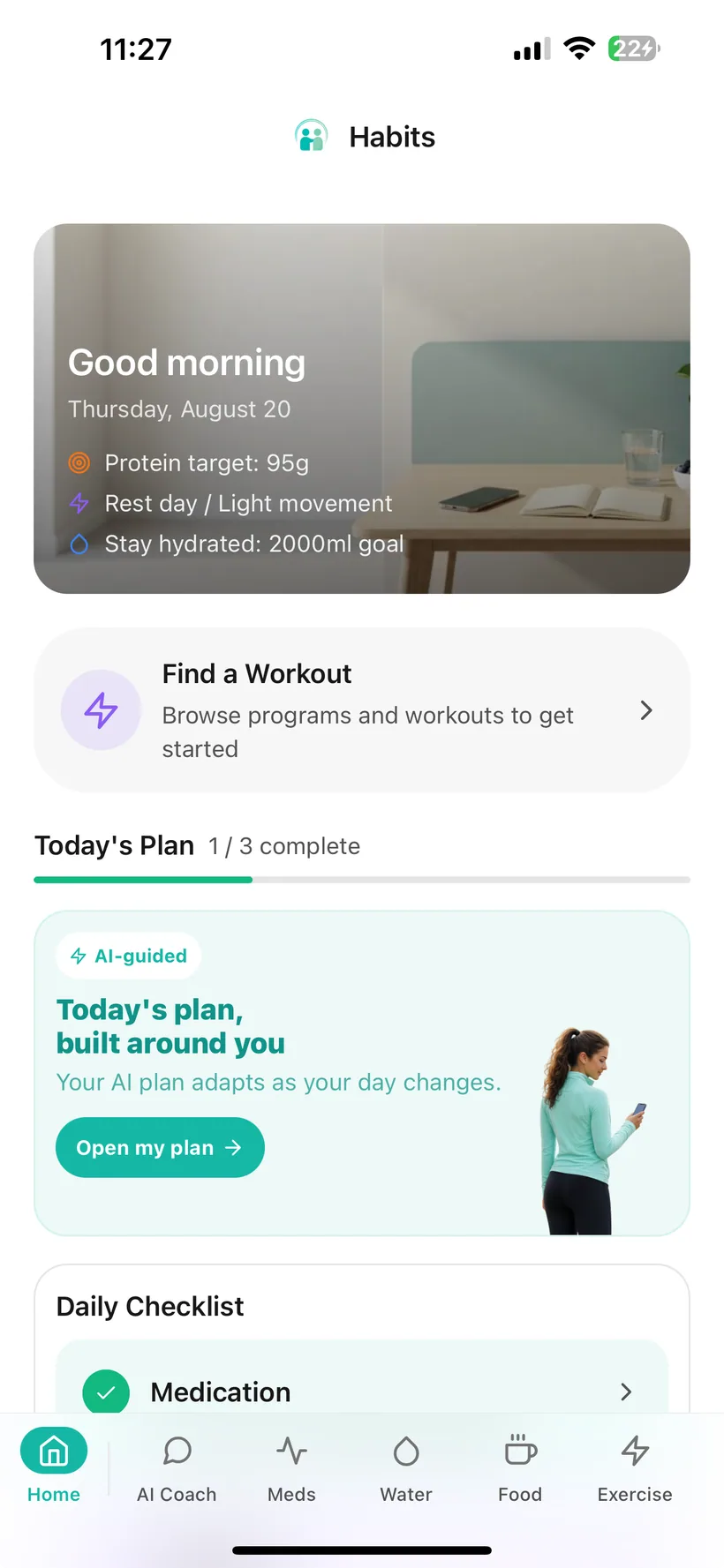
What can you track in Habits?
Habits can keep records across:
- medication — schedules, reminders and logged doses;
- side effects — entries and history;
- food and nutrition — meals, calories, protein, carbohydrates and fat;
- hydration — water and other drinks against your personal goal;
- exercise — manual workouts, structured programmes and saved sessions;
- mood — daily check-ins, notes and calendar history;
- sleep — duration, quality and notes;
- weight and measurements — trends, goals and body measurements;
- progress photos — a separate visual progress record.
Habits also includes reports, reminders, data export and optional AI features for supported logging, food estimates, workout generation, insights and reports.
Explore Habits features
Jump to the part you want to understand:
Medication tracking
Keep the schedule and the record in the same place.
Set up the schedule you want to track
Add a medication from the available list or create a custom entry, then record the dosage and schedule.
Supported schedule types include:
- daily;
- weekly;
- bi-weekly;
- monthly;
- custom.
Log a dose
Use the dose-log action to record when you took a scheduled dose.
See what is coming next
Habits shows the next scheduled dose and keeps recent dose history available for review.
Set medication reminders
Choose reminder times and control reminders separately for each medication.
Keep side effects nearby
Record side effects from the available list and keep a history alongside the medication area.
Boundary note:
Habits records the schedule and information you enter. It does not prescribe medication or tell you to change a dose.
Food, nutrition and protein tracking
Keep meals and macros visible without rebuilding the same entries every day.
Manual food logging
Record:
- meal name;
- calories;
- protein;
- carbohydrates;
- fat;
- meal type.
Habits shows running daily macro totals at the top of the food log.
Saved meals
Save meals you eat often and add them again from your personal library.
AI food photo analysis
Take or upload a photo and Habits can return an estimated meal name, description and macro breakdown before you save it.
AI text food logging
Describe a meal in ordinary language and Habits can estimate the entry using AI.
Nutrition analysis
Generate an AI-assisted analysis of the current day or previous week.
Meal planning
Pro includes a seven-day AI meal-plan generator.
Some advanced nutrition preference functionality is rollout-controlled, so the exact personalisation options available may vary by account.
Supporting note:
AI-generated food and nutrition values are estimates and should not be treated as exact clinical or dietary measurements.
Hydration tracking
Keep a simple record of what you drink and how it compares with the goal you set.
More than water
Log:
- water;
- coffee;
- tea;
- juice;
- electrolytes;
- protein shakes;
- collagen;
- other drinks.
Use ml or oz
Choose the unit system that fits you.
Track a daily goal
See your total intake, goal and progress percentage.
Quick-add from Today
Add common water amounts without opening the full hydration log.
Set recurring reminders
Choose water reminders every 1, 2, 3 or 4 hours during the active hours you select.
Exercise and movement
Track activity, follow a programme or build a workout for the day.
Structured programmes
Habits includes multi-week programmes for different settings and experience levels, including options designed for:
- beginners;
- home training;
- gym training;
- intermediate training;
- gentler movement.
Guided workout mode
Work through:
- warm-up;
- exercises and sets;
- rest periods;
- cooldown.
Exercises can include form notes and demonstration links.
Manual exercise logging
Record an exercise session directly and keep the history.
AI workout generation
Describe the kind of session you want and Habits can generate a workout with details such as difficulty, location, duration, warm-up, exercises and cooldown.
Boundary note:
Habits can help organise movement and strength routines. It does not measure muscle mass or guarantee a body-composition outcome.
Mood and sleep
Keep simple records for two parts of the week that are easy to forget when looking back.
Mood
Use a five-point mood check-in, add optional notes and review previous entries in a monthly calendar.
Habits also tracks:
- current mood-logging streak;
- number of mood entries during the week.
Sleep
Record:
- hours and minutes slept;
- sleep quality;
- optional notes.
You can also set a personal sleep goal.
Weight and progress
Keep more than one kind of progress record.
Weight
Record weight in kg or lb and set a goal weight if you want one.
Review the weight chart across:
- 7 days;
- 30 days;
- 90 days.
Body measurements
Keep body measurements separately from weight.
Progress photos
Store progress photos in your Habits account and review them over time.
Keeping these records together does not mean every change needs to be reduced to a single number.
One home base for the day
The Today screen brings your selected categories into a single starting point.
Depending on your setup, Today can include:
- your configurable daily checklist;
- today's scheduled workout;
- water and weight quick-add tools;
- overview charts for supported categories;
- shortcuts to core trackers;
- articles and practical tips.
You can decide which categories appear in your daily checklist rather than treating every tracker as mandatory.
AI where it can save effort
AI is optional in Habits.
Core tracking remains available if you decline or switch off AI processing.
Depending on the feature and your access, Habits can use AI for:
Conversational logging
Interpret supported natural-language entries for categories such as food, hydration, mood, weight and exercise.
Food photo analysis
Estimate a meal and macro breakdown from an image.
Workout generation
Create a workout from the type of session you describe.
Nutrition analysis
Review recorded food data from a day or week.
Health insights
Surface trends and correlations from the information recorded in Habits.
Reports
Generate structured weekly and monthly summaries based on your records.
Advanced Pro features
Some planning and nutrition features are Pro-only or controlled rollouts.
Boundary note:
Habits AI is not a doctor, pharmacist or medication-prescribing service.
Reports and analytics
Turn individual entries into a record that is easier to review.
Reminders that fit the routine you set
Habits supports local device reminders for several categories.
Medication
Choose reminder times for each medication.
Hydration
Set recurring reminders every 1–4 hours during the active hours you choose.
Water-goal check
Use a midday progress nudge based on the goal and threshold you configured.
Exercise
Choose reminder days and a preferred time.
Programme workouts
Get a reminder on scheduled workout days when enrolled in a structured programme.
Once configured, these reminders are delivered locally on the device and can work without an internet connection.
Control how your data is used inside Habits
Habits includes controls for tracking data, AI and account access.
AI consent
Choose whether to enable AI processing.
Declining AI does not disable the core trackers.
Master AI switch
Turn AI data processing off from the AI Privacy Dashboard.
Nine category controls
Manage AI access separately across:
- medication;
- hydration;
- food;
- exercise;
- mood;
- weight;
- sleep;
- photos;
- measurements.
AI access history
Review recorded AI data-access events by category, time and feature.
PII masking
For supported AI requests, Habits applies PII masking before processing to filter identifiers such as names, phone numbers and health IDs.
Habits currently uses OpenAI models for its AI features. Relevant information from categories you allow may still be processed to provide the feature.
Data export
Export your logged health data in CSV or JSON.
Account deletion
Delete your account through the app's re-authenticated deletion flow.
Biometric lock
Use Face ID or Touch ID to lock the app on supported devices.
Connected health — rolling out
On iPhone, Habits includes Apple HealthKit support for selected health metrics:
- steps;
- heart rate;
- heart-rate variability (HRV);
- blood oxygen, where available in Apple Health.
When connected-health access is enabled for your account, supported synced data can appear in Habits analytics and may be included in AI insights you have enabled.
Availability varies because this feature is being rolled out progressively.
Smaller features that make the system easier to live with
Habits also includes:
Apple, Google and email sign-in
Choose the account method that suits you.
Biometric app lock
Use Face ID or Touch ID on supported devices.
Metric or imperial units
Switch between measurement systems.
Dark mode
Choose a darker interface when you prefer it.
Health goals
Set personal goals for hydration, movement, nutrition, protein, sleep and weight.
Streaks and badges
See consecutive-day tracking streaks and milestone badges across supported categories.
Health articles
Read health content delivered through the Habits article feed.
Google Calendar — Pro
Connect Google Calendar with read-only access and view upcoming events from the next seven days inside Habits. You can disconnect the connection at any time.
Health information sources
Settings includes links to selected public health-information sources used as references within the app. A link to an external organisation does not imply that organisation endorses Habits.
Data export
Download your logged health data in CSV or JSON.
Start with the core. Add Pro when you want more.
Habits includes a Free tier and an optional Pro subscription.
Included in Free
Core features include:
- medication tracking and reminders;
- hydration tracking and reminders;
- manual food and macro logging;
- exercise tracking and structured programmes;
- mood, sleep, weight and progress-photo tracking;
- AI chat with a daily usage allowance;
- AI food-photo analysis;
- AI workout generation;
- AI insights;
- a partial weekly report;
- Doctor Report PDF;
- streaks and badges;
- data export;
- AI Privacy Dashboard;
- biometric lock.
Additional Pro features
Pro expands Habits with features such as:
- higher daily AI usage allowance;
- full weekly report across additional categories;
- monthly report and PDF;
- seven-day AI meal planning;
- Google Calendar integration;
- selected advanced planning and nutrition functionality, subject to feature availability and rollout.
You do not need every feature to get value from Habits.
A feature-rich app should not force a feature-rich routine.
You can keep Habits simple.
For example:
Medication + hydration
or:
Medication + protein + meals
or:
Medication + movement + sleep
or:
Medication + side effects + a report before an appointment
These are examples of how the app can be configured, not health recommendations.
Start with what you actually want to keep track of. Add more only when it becomes useful.
Features for tracking and organisation—not treatment.
Habits can help you record, organise and review information around your routine.
It does not:
- prescribe GLP-1 medication;
- recommend which medication you should use;
- tell you to increase, reduce, skip or stop a dose;
- diagnose side effects or health conditions;
- provide emergency monitoring;
- guarantee weight, nutrition, fitness or medication outcomes;
- replace qualified healthcare advice.
If you need medical or treatment guidance, contact an appropriate healthcare professional.
Habits feature questions
What are the main features in Habits?
Habits includes medication and side-effect tracking, food and protein logging, hydration, exercise programmes, mood, sleep, weight, measurements, progress photos, reminders, reports, data export, privacy controls and optional AI features.
Does Habits track GLP-1 medication?
Yes. Habits can store medication schedules, reminders and dose history. It does not prescribe medication or recommend dose changes.
Can Habits track side effects?
Yes. You can record side effects and review the history of the entries you made. Habits does not diagnose the cause or severity of a symptom.
Can I track protein?
Yes. Food entries include protein, calories, carbohydrates and fat, with daily totals shown in the food area.
Does Habits include workout programmes?
Yes. Habits includes structured programmes for home, gym and gentler movement, plus manual exercise tracking and AI-generated workouts.
Does Habits have food-photo logging?
Yes. You can take or upload a food photo and receive an AI-estimated meal and macro breakdown before saving the entry.
Can I use Habits without AI?
Yes. The core trackers remain available when AI processing is declined or switched off.
What can Habits AI access?
AI access is controlled through consent and category-level settings. Habits includes separate controls across medication, hydration, food, exercise, mood, weight, sleep, photos and measurements.
Does Habits create reports?
Yes. Habits includes weekly reports, Pro monthly reporting and a Doctor Report PDF created from information recorded in the account.
Can I export my data?
Yes. Habits supports CSV and JSON export of logged health data.
Does Habits work with Apple Health?
Habits includes Apple HealthKit support for steps, heart rate, HRV and blood oxygen where those metrics are available in Apple Health. Connected-health functionality is rolling out progressively, so it may not yet be enabled for every account.
Is there a Pro plan?
Yes. Habits has a Free tier and an optional Pro subscription with expanded reports, AI usage and selected advanced features.
Where can I download Habits?
Habits: GLP-1 Companion is available on the Apple App Store.
Use what matters. Leave the rest until you need it.
Habits gives medication, nutrition, hydration, movement, mood, sleep and progress one place to live—without requiring you to turn every feature into a daily obligation.
Habits: GLP-1 Companion is available now on the App Store.
Small print:
Habits is a health tracking and habit-support application. It does not provide diagnosis, treatment or medication prescribing and is not a substitute for advice from a qualified healthcare professional.