

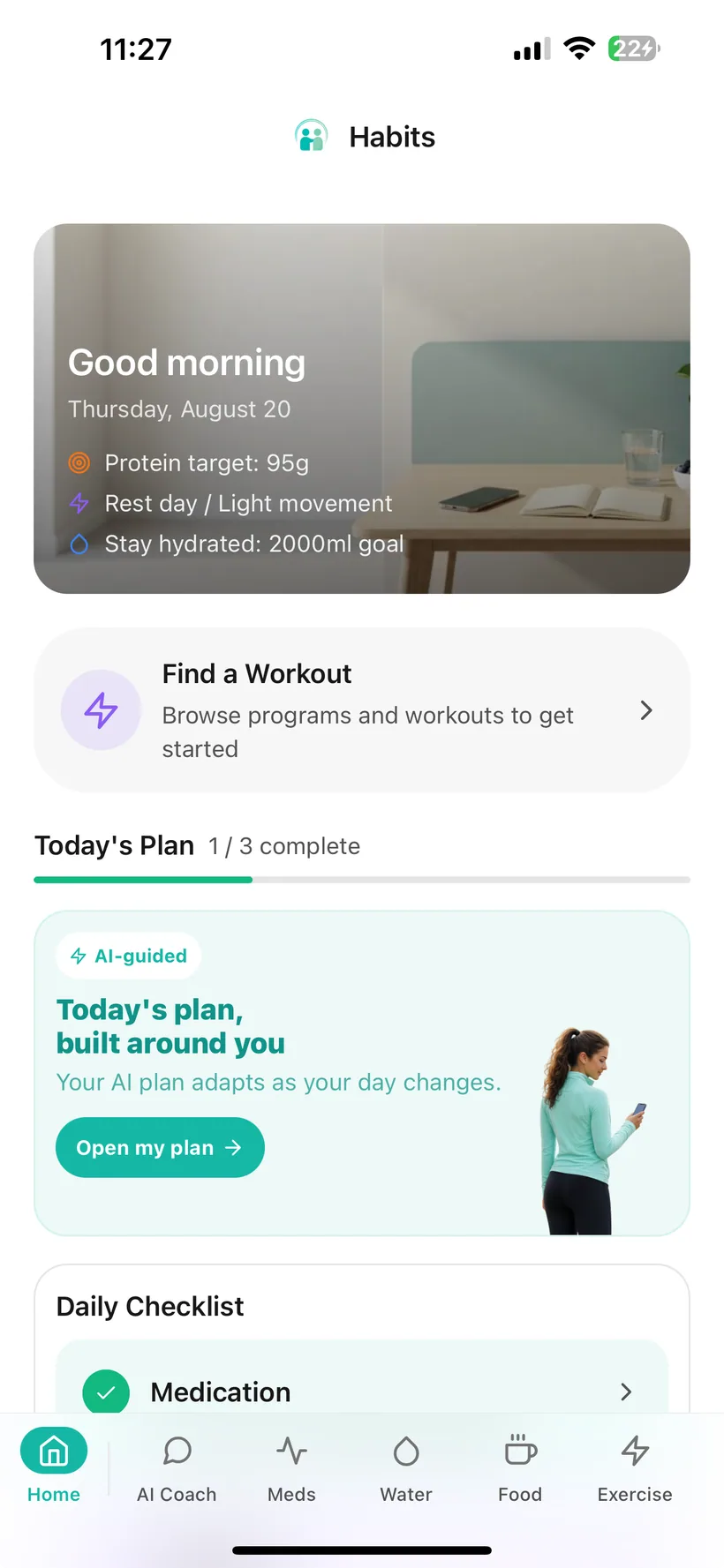
How does Habits work?
Habits works in four practical layers:
1. Set up what you want to track
Create your account, add your medication schedule, choose goals and reminders, and decide which health categories you want visible in your daily checklist.
2. Record the day as it happens
Log a dose, add water, record food and protein, complete a workout, or enter mood, sleep and weight. Use manual entry, quick-add tools or supported AI-assisted logging.
3. Review your own history
Look back at logs and charts, generate weekly reports, export your logged data, or create a Doctor Report PDF that you can choose to share with a healthcare professional.
4. Control how optional AI fits in
Core tracking remains available without AI. If you enable AI features, Habits gives you a master AI control, category-level permissions and an access history.
Step 1 — Set up the parts you actually want to use.
Create a Habits account with email, Apple or Google. If you register with email, Habits asks you to verify that email address before continuing.
Then start with the information that matters most to your routine.
Add your medication
Choose a medication from the available list or create a custom entry, record the dosage and schedule you want to track, then choose whether you want reminders.
Habits supports daily, weekly, bi-weekly, monthly and custom schedules.
Choose your goals
Set targets for areas such as hydration, exercise, nutrition, protein, sleep and weight.
Choose what appears in Today
Habits lets you control which categories appear in your daily checklist, including medication, protein, movement, hydration, mood, sleep, weight and nutrition.
You do not need to complete every tracker to use Habits.
Step 2 — See the day from one screen.
The Today dashboard is the home base in Habits.
It brings together the parts of the day you chose to keep visible, rather than making you remember which tracker to open next.
Depending on your setup, Today can include:
- your daily checklist, including medication if you have chosen to show it;
- today's scheduled workout;
- water quick-add buttons;
- quick weight logging;
- protein, water, exercise, mood or sleep overview charts;
- shortcuts into meals, workouts, hydration, mood, weight, medication and photos;
- health articles and GLP-1-focused tips.
If a category does not matter today, it does not need to be the centre of your screen.
Step 3 — Use the quickest useful way to record something.
Different information needs different levels of effort.
Habits gives you several ways to keep a record.
One-tap dose logging
When you take a scheduled dose, log it with a tap and keep the timestamp in your medication history.
Quick-add water or weight
Add common water amounts or record weight directly from Today without opening a full form.
Manual food logging
Enter a meal with calories, protein, carbohydrates and fat when you want direct control over the numbers.
Saved meals
Keep meals you eat regularly in your own library and add them again without rebuilding the entry.
Food photo analysis
Take or upload a photo and Habits can return an estimated meal name and macro breakdown that you can review before saving the entry.
Natural-language logging
For supported entries, describe what happened in ordinary language and AI can interpret the details for trackers such as hydration, food, mood, weight or exercise.
Manual health check-ins
Mood, sleep, workouts, side effects, weight and measurements can all be recorded directly.
Supporting note:
AI-generated food and nutrition values are estimates. Review them as tracking support rather than exact clinical or dietary measurements.
Step 4 — Let today's logs become tomorrow's context.
The value of tracking is not the individual entry. It is being able to look back without rebuilding the story from memory.
Habits keeps histories for the categories you record, including medication, side effects, meals, hydration, exercise, mood, sleep, weight and measurements.
Medication history
Review recent doses and the medication schedule you recorded.
Side-effect history
Keep side-effect entries alongside your medication records for later reference.
Weight and body measurements
View weight trends across 7, 30 or 90 days and keep body measurements separately.
Mood history
Use the monthly calendar and previous entries to look back at mood check-ins.
Sleep history
Review logged sleep duration, quality and notes.
Food, water and exercise history
Look back at entries instead of relying on memory at the end of the week.
See more than a list of entries.
Habits can turn your recorded information into summaries and reports.
Weekly report
Generate a seven-day report from your Habits data.
The Free version includes medication and hydration sections. Pro expands the weekly report across additional categories.
Monthly report
Pro can generate a 30-day health summary from the information recorded in Habits.
Charts
Use 7-, 30- and 90-day views for supported analytics such as weight, water, exercise, mood, sleep and calorie intake.
AI-generated insights
Where enabled, Habits can surface trends and correlations from your own records.
Insights are labelled Low, Medium or High according to how much data history is available.
Those labels describe data volume, not medical certainty.
Keep an organised record when you need to talk it through.
Habits includes a Doctor Report PDF built from information recorded in your account.
You can choose to generate the report before an appointment or share it with a healthcare professional.
You can also export your logged data in CSV or JSON format.
The report is designed to organise your records. It is not clinician-authored, a diagnosis, medical assessment or treatment recommendation.
AI is a layer you can choose—not a requirement for tracking.
Habits includes optional AI features, but the core trackers remain available if you decline AI processing.
Depending on the feature and your access, AI can support activities such as:
- interpreting supported natural-language logs;
- estimating food from a photo or text description;
- generating workouts;
- producing nutrition analysis;
- generating reports;
- surfacing trends and correlations from your recorded data.
Some advanced AI planning and nutrition features are part of Pro or controlled rollouts.
AI in Habits is not a doctor, pharmacist or medication-prescribing service.
Decide how much of your Habits data AI may use.
If you enable AI features, Habits gives you controls inside the app.
Master AI control
Turn AI data processing on or off.
Category-level permissions
Control AI access separately across medication, hydration, food, exercise, mood, weight, sleep, photos and measurements.
AI access history
Review recorded AI data-access events by time, category and feature.
PII masking
For supported AI requests, Habits applies PII masking before processing to filter identifiers such as names, phone numbers and health IDs.
Habits currently uses OpenAI models to provide its AI features. Relevant health context you choose to make available may still be processed to provide the feature.
Use reminders where remembering is the problem.
Habits supports local device reminders for several routines.
Medication reminders
Set reminder times for each medication and turn reminders on or off individually.
Hydration reminders
Choose recurring water reminders during the hours you set.
Water-goal check
Use a midday nudge based on progress toward the hydration goal you configured.
Exercise reminders
Choose a time and the days of the week when you want a movement reminder.
Programme reminders
If you are enrolled in a structured workout programme, Habits can remind you on scheduled workout days.
Once configured, these reminders are delivered locally on the device and can work without an internet connection.
Habits can be broad without making your routine complicated.
There are people who want detailed nutrition logs, workout programmes and reports.
There are also days when all you want to record is a dose and some water.
Habits is designed so you can use the categories that are useful to you and leave the others alone.
For example, one person might choose to keep only:
Medication → hydration → protein
Another might keep:
Medication → meals → movement → sleep
And someone preparing for an appointment might use:
Medication → side effects → report
These are examples of how the app can be configured, not health recommendations. There is no requirement to build the same tracking routine as someone else.
Know the boundary.
Habits can help you:
- record medication schedules and dose history;
- keep side-effect records;
- log food, protein, hydration, exercise, mood, sleep and progress;
- set reminders and personal tracking goals;
- review charts and histories;
- generate reports from the information you recorded;
- use optional AI features where you choose.
Habits does not:
- prescribe GLP-1 medication;
- decide which medication is right for you;
- tell you to increase, reduce, skip or stop a dose;
- diagnose symptoms or side effects;
- provide emergency monitoring;
- replace a doctor, pharmacist, dietitian or other qualified healthcare professional.
If you have a medical concern or need treatment guidance, contact an appropriate healthcare professional.
Questions about using Habits
Do I need to track every category every day?
No. Habits lets you choose which categories appear in your Today checklist. You can focus on a smaller routine and use other trackers only when they are useful.
Can I use Habits just for medication tracking?
Yes. You can set up medication, dosage, schedule and reminders and keep a history of logged doses. Other trackers are available if you want them.
Can I record side effects in Habits?
Yes. Habits includes side-effect logging and a history of the entries you recorded. It does not diagnose side effects or tell you how to treat them.
Can I track protein in Habits?
Yes. Food entries include protein, calories, carbohydrates and fat, and Habits shows your daily macro totals. You can log manually, reuse saved meals or use supported AI-assisted food logging.
Do I have to use AI?
No. Declining or disabling AI does not remove the core tracking features.
What does AI do in Habits?
Optional AI features can assist with supported logging, food estimates, workout generation, nutrition analysis, reports and pattern summaries. Availability depends on the feature, Free/Pro access and rollout status.
Does Habits use information from my trackers for AI?
Only after AI consent is enabled. Habits provides a master AI control and category-level settings, and currently uses OpenAI models for AI features. Information from categories you allow may be processed to provide the AI feature. The Privacy section explains the current data flow and controls in more detail.
Can I export my data?
Yes. Habits supports CSV and JSON export of logged health data.
Can I make a report for a healthcare appointment?
Yes. Habits includes a Doctor Report PDF built from information you recorded. It is not clinician-authored and is not a diagnosis or treatment recommendation.
Does Habits work offline?
Some functions are local or have offline behaviour, including configured local reminders and offline fallback article content. Do not assume every feature works without an internet connection; AI and server-based features require connectivity.
Is Habits available on Android?
The product codebase supports Android, but this website should not display a public Google Play download link until the verified public listing URL is supplied.
Where can I download Habits now?
Habits: GLP-1 Companion is available on the Apple App Store.
Start with one thing. Build from there.
Set up your medication. Choose what you want visible today. Add the routines that become useful over time.
Habits: GLP-1 Companion is available now on the App Store.
Small print:
Habits is a health tracking and habit-support application. It does not provide diagnosis, treatment or medication prescribing and is not a substitute for advice from a qualified healthcare professional.