

What can you track in the Habits hydration feature?
Habits lets you:
- log water and several other beverage types;
- record amounts in ml or oz;
- set your own daily hydration tracking goal;
- see today's total and progress percentage;
- review today's hydration entries;
- delete an entry if you need to correct the log;
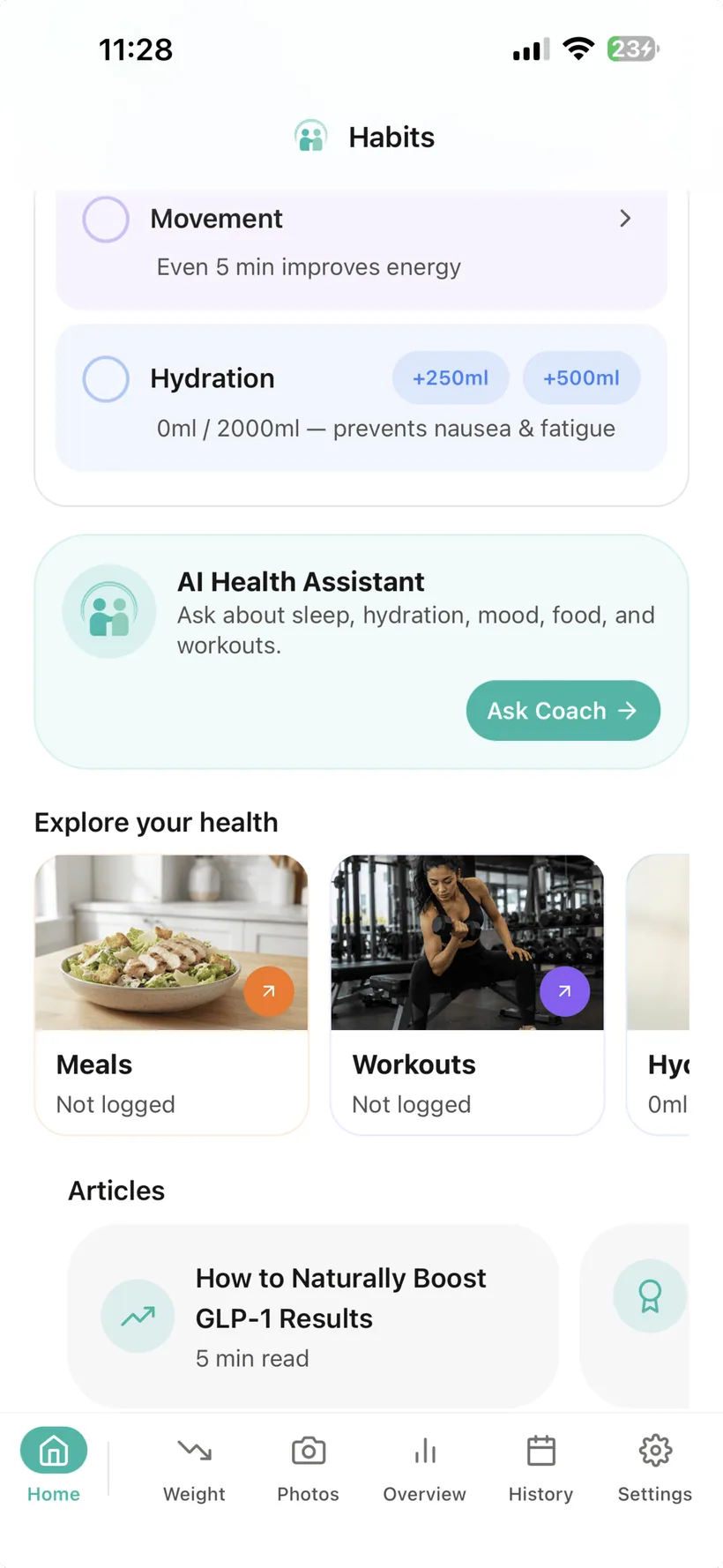
- quick-add water from the Today screen;
- switch the Today overview chart to Water;
- set recurring water reminders;
- use a configurable midday goal-progress reminder;
- review hydration in Habits analytics;
- include hydration in the Free weekly report.
Your hydration goal is a tracking target you configure. Habits does not decide how much fluid you medically need.
Add water without opening another screen.
The Today dashboard includes quick-add controls for:
- +250 ml
- +500 ml
- custom amount
Use them when you want to update the hydration record without going through the full tracker.
If you use imperial units, Habits supports oz elsewhere in the hydration feature.
See Water in the Today overview
The Today dashboard also includes an overview chart that can be switched to Water, giving you another quick view of the hydration data recorded in Habits.
Keep different drinks in the same hydration log.
The Habits hydration feature supports these beverage categories:
- Water
- Coffee
- Tea
- Juice
- Electrolytes
- Protein Shake
- Collagen
- Other
You choose the category and record the amount.
Listing a beverage type in Habits does not mean the app is recommending that drink or saying it is appropriate for a particular health condition.
Track hydration in the unit system you prefer.
Habits supports:
- millilitres (ml)
- fluid ounces (oz)
Your unit preference is controlled in Habits settings.
Compare today's total with a goal you chose.
Set a daily hydration tracking goal in Habits and see:
- the amount logged today;
- the goal you configured;
- your current progress percentage.
The goal is there to help you track against a reference you selected.
Habits does not calculate a medically appropriate fluid target for you.
If a healthcare professional has advised you to restrict or manage fluid intake for a health condition, follow that professional guidance rather than a generic app goal.
See what you already recorded.
The hydration screen keeps today's entries visible.
Use the log to check:
- the beverage entries recorded today;
- the amounts entered;
- the total shown for the day.
If an entry is wrong, you can delete it and correct your record.
Add reminders when remembering is the problem.
Habits supports recurring water reminders at intervals of:
- every 1 hour;
- every 2 hours;
- every 3 hours;
- every 4 hours.
You can also choose the hours of the day when those reminders are active.
Once configured, the reminders are scheduled locally on the device and can work without an internet connection.
Get a progress nudge based on the goal you configured.
Habits can send a midday water-goal check based on progress toward your personal hydration target.
You choose the progress threshold used for that reminder.
This is a reminder against the tracking goal you set—not a medical assessment of hydration status.
Look beyond a single day.
Habits includes water-intake charts in the Analytics area.
Use supported 7-, 30- and 90-day views to review the water amounts recorded in Habits over time.
The chart reflects your logged data. It does not diagnose hydration status.
Keep hydration in the weekly summary.
The Free Habits weekly report includes:
- Medication
- Hydration
Pro expands weekly reporting across additional tracked categories.
This gives hydration a place in the same weekly review as the rest of your Habits record.
If you use streaks, hydration can be one of them.
Habits includes category streaks.
For Hydration, the app's streak logic counts an active day when the total fluid intake recorded in Habits meets or exceeds the daily hydration goal you configured.
A streak reflects app-recorded behaviour against your chosen goal. It is not a measure of medical hydration status or health improvement.
Use natural language when that is easier.
When AI is enabled, supported conversational logging can add hydration information from what you type.
For example, you can describe a drink in ordinary language instead of opening the hydration form.
Hydration is also one of the categories with its own AI permission in the Habits AI Privacy Dashboard.
You can use the core hydration tracker without enabling AI.
Water does not need its own app.
Hydration can sit beside:
- medication;
- food and protein;
- movement;
- mood;
- sleep;
- weight and progress.
That means the water record can be part of the same Habits routine without making every category mandatory.
A water tracker is not a hydration diagnosis.
Habits does not:
- calculate how much fluid you medically need;
- diagnose dehydration;
- tell you that a symptom is caused by low fluid intake;
- recommend electrolytes for a medical condition;
- tell you to exceed a fluid restriction;
- guarantee that reminders will make you meet a goal;
- treat nausea, headache, constipation, fatigue or another symptom.
If you have a medical condition, take medication or have been given instructions that affect fluid intake, follow appropriate professional guidance.
GLP-1 hydration tracking questions
Can Habits track water?
Yes. Habits lets you log water amounts and compare the day's total with a hydration goal you configured.
What other drinks can I log?
The current beverage list includes Water, Coffee, Tea, Juice, Electrolytes, Protein Shake, Collagen and Other.
Can I use ml or oz?
Yes. Habits supports metric and imperial units, including ml and oz for hydration.
Can I add water quickly?
Yes. The Today dashboard includes +250 ml, +500 ml and custom water quick-add controls in the current verified feature set.
Can I set a water goal?
Yes. You can configure your own daily hydration tracking goal. Habits does not determine the medically appropriate amount for you.
Does Habits remind me to drink water?
Habits supports recurring water reminders every 1, 2, 3 or 4 hours during the active hours you choose.
Does Habits have a water-goal reminder?
Yes. You can configure a midday progress check based on a percentage of the hydration goal you set.
Do hydration reminders need the internet?
Once configured, the local device reminders can work without an internet connection.
Can I see water trends over time?
Yes. Habits includes water-intake charts in Analytics with supported 7-, 30- and 90-day views.
Is hydration included in the Free weekly report?
Yes. Medication and Hydration are the two sections included in the Free weekly report.
Does Habits have a hydration streak?
Yes. Hydration is one of the category streaks in Habits. The app counts an active hydration day when recorded fluid intake meets or exceeds the hydration goal you configured. A streak is not a medical hydration assessment.
Does Habits include hydration tips?
The app includes a GLP-1 Hydration Tips carousel. This website does not reproduce or make claims from those tips until the tip content has completed separate health-content review.
Can I log hydration through AI chat?
When AI is enabled, supported conversational logging can add hydration information from natural-language input.
Do I need AI to use the hydration tracker?
No. Core hydration tracking works without AI.
Can I switch off AI access to Hydration?
Yes. Hydration is one of the separate AI permission categories in the Habits AI Privacy Dashboard.
Does Habits tell me how much water I should drink on a GLP-1?
No. Habits lets you set and track your own goal; it does not prescribe an individual medical fluid target.
Does Habits tell me whether I need electrolytes?
No. Electrolytes are an available beverage category for logging. Habits does not determine whether electrolyte drinks are medically appropriate for you.
Can Habits tell if I am dehydrated?
No. Habits tracks the information you enter; it does not diagnose dehydration.
Where can I download Habits?
Habits: GLP-1 Companion is available on the Apple App Store.
About this page
Last updated: 20 August 2026
This page describes current Habits hydration-tracking, reminder and reporting functionality based on the verified product feature reference.
It is product information, not a personalised fluid-intake recommendation or medical hydration assessment.
For individual fluid requirements or medical restrictions, use appropriate professional guidance.
Make the water log quick enough to keep using.
Quick-add from Today, use the goal you configured, add reminders if they help and review hydration as part of your broader Habits record.
Habits: GLP-1 Companion is available now on the App Store.
Small print:
Habits tracks information you enter. It does not diagnose dehydration or provide personalised medical fluid recommendations.