

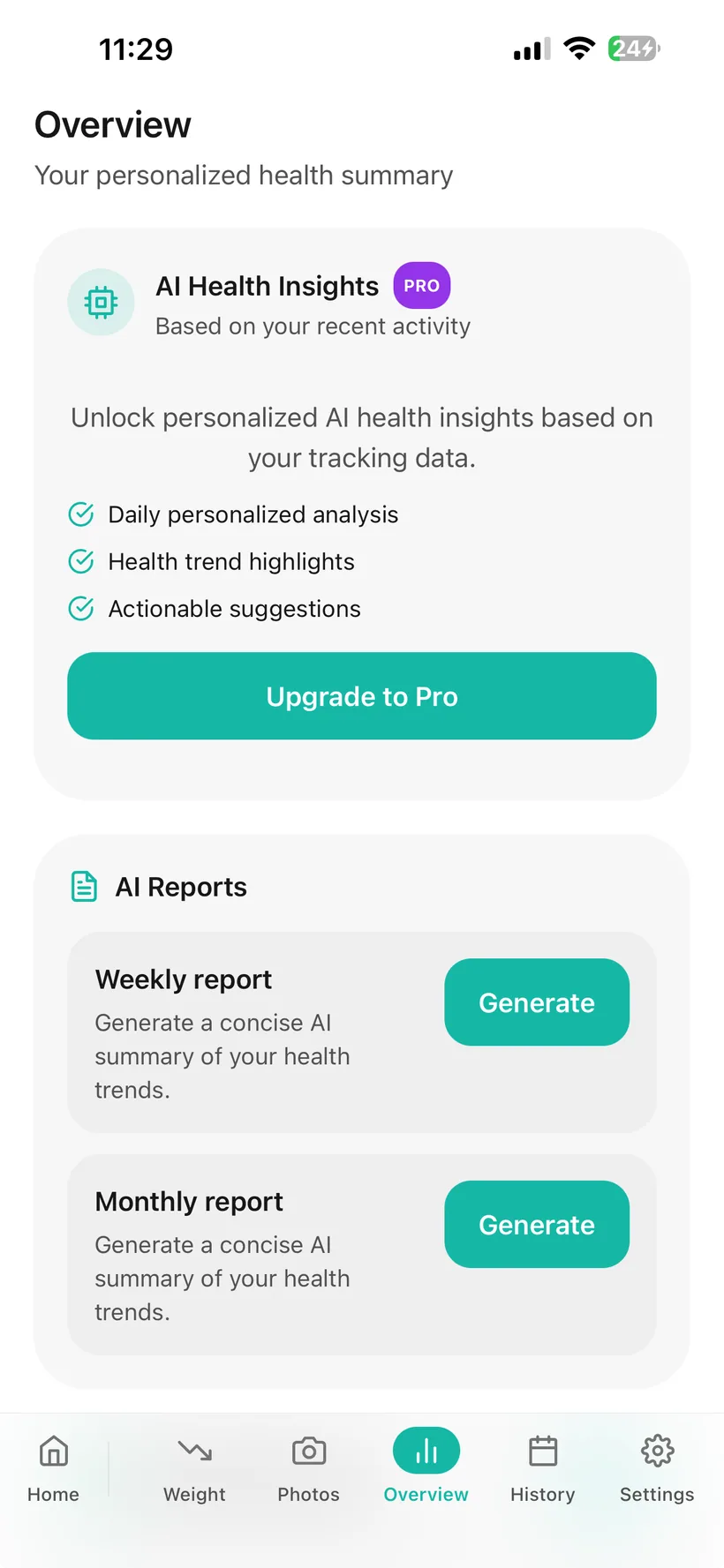
What reports and analytics are available in Habits?
Habits includes:
- 7-, 30- and 90-day analytics views;
- charts for Weight, Water, Exercise, Mood, Sleep and calorie intake;
- optional AI trends and correlations;
- a Weekly Report;
- a Weekly PDF;
- a Pro Monthly Report;
- a Pro Monthly PDF;
- a Doctor Report PDF;
- JSON and CSV data export.
The Free weekly report includes Medication and Hydration.
Pro expands weekly reporting across additional Habits categories.
The Doctor Report PDF is included in both Free and Pro.
The Weekly and Monthly summaries are AI-generated. This page does not assume that the Doctor Report itself is entirely AI-authored.
Look at the record across more than one time window.
Habits Analytics supports:
- 7 days
- 30 days
- 90 days
The analytics area includes views for:
- Weight
- Water
- Exercise
- Mood
- Sleep
- Calorie intake
Use the charts to review the data recorded in Habits.
The charts do not explain why a value changed or tell you what medical action to take.
Summarise the previous seven days.
Habits can generate a seven-day report from recorded data.
Free
The Free weekly report includes:
- Medication
- Hydration
Pro
Pro expands the weekly report across:
- Medication
- Hydration
- Nutrition
- Exercise
- Mood
- Sleep
- Weight
- Wearables, where connected-health data is available
The report is AI-generated from recorded information and requires optional AI processing to be available.
It is a summary—not a diagnosis or treatment recommendation.
Habits has category-level AI permissions, but this website does not promise how an individual disabled category changes the final report until that production behavior is verified.
Keep the weekly report in a PDF format.
Habits supports Weekly PDF export.
Free
The Free Weekly PDF reflects the partial Free report.
Pro
Pro includes the full Weekly PDF.
Use the PDF as a copy of the report you generated.
Review a longer 30-day summary with Pro.
Habits Pro includes:
- a 30-day AI-generated health summary;
- a Monthly PDF.
The monthly report brings together a longer period of recorded Habits data.
As with the weekly report, it is automated tracking support rather than a clinical assessment.
Review the reporting period shown in the report you generate.
Habits weekly and monthly summaries are built from recorded data for a defined period.
Before relying on a report after adding or changing recent entries, review the report itself to confirm the period and information shown.
Create an organised report you can choose to share.
Habits includes a Doctor Report PDF in both Free and Pro.
The report is generated from information recorded in your Habits account and is formatted so you can review it or choose to share it with a healthcare professional.
Because the exact production PDF has not yet been audited for this website, Habits does not currently claim that every line in the Doctor Report is user-entered, AI-generated or clinically interpreted.
The Doctor Report is not clinician-authored, doctor-approved or a substitute for a healthcare professional's own records and judgement.
Do not assume every Habits tracker appears in the PDF.
The current verified product reference confirms that the Doctor Report PDF exists, but it does not document every field included in the production PDF.
For that reason, this website does not promise that the Doctor Report includes:
- every side-effect entry;
- every body measurement;
- progress photos;
- every AI Insight;
- every wearable metric;
- every nutrition record.
The final production PDF should be treated as the source of truth for:
- its actual fields;
- the reporting period shown;
- whether it identifies when the file was generated;
- whether any content is AI-generated;
- how user-entered data and automated interpretation are distinguished.
Use the report as organised context.
A report can give you one place to review some of the information you recorded before a healthcare conversation.
You decide whether to share it.
A healthcare professional decides what information is relevant to your care.
Habits does not make that decision for them.
Look for patterns in the records you allow AI to use.
Habits includes optional AI Insights that can surface:
- trends;
- correlations;
- automated suggestions based on recorded data.
Insights also carry a Low / Medium / High label based on the amount of data available.
That label describes data volume—not clinical certainty.
A correlation does not prove causation, and an automated suggestion is not medical advice.
Insights are not presented here as real-time monitoring.
Wearable metrics can add context where connected health is enabled.
On iPhone, Habits includes rollout-controlled Apple HealthKit support for selected metrics:
- Steps
- Heart Rate
- Heart-rate variability (HRV)
- Blood Oxygen, where available
When connected-health access is enabled, supported wearable information can appear in Habits analytics and AI insights.
Connected-health availability may vary while the feature is being rolled out.
Keep a portable copy of your logged health data.
Habits lets you export health data in:
- JSON
- CSV
Use those files when you want a portable copy of logged data outside the app.
This page does not claim that JSON/CSV export includes every original media file, such as Progress Photo image files.
AI-generated reports use the Habits AI privacy system.
Habits includes:
- an AI consent choice;
- a master AI switch;
- category-level AI permissions;
- an AI access history;
- PII masking for supported AI processing.
Core tracking remains available if AI is disabled.
Habits currently uses OpenAI models for optional AI features, including AI-generated reports and insights.
For supported AI processing, PII masking filters identifiers such as names, phone numbers and health IDs before information reaches the AI model. Relevant health/tracking context may still be processed to provide the enabled feature.
The website does not yet promise how disabling one individual category changes a generated report until that behavior is verified in production.
Treat exported reports like other personal health records.
A Habits report or data export can contain sensitive information you recorded.
Before sharing a file:
- check what is included;
- confirm who you are sending it to;
- use the sharing method you consider appropriate.
Habits also includes:
- Face ID or Touch ID app locking on supported devices;
- re-authenticated account deletion.
The biometric app lock protects access to the app on a supported device; it does not by itself describe the security of a PDF after you export or share it.
Start with core reporting. Expand it with Pro.
Free includes
- Medication + Hydration weekly report;
- partial Weekly PDF;
- Doctor Report PDF;
- JSON/CSV health-data export;
- core analytics;
- AI Insights within the applicable AI allowance.
Pro adds
- expanded weekly report;
- full Weekly PDF;
- 30-day Monthly Report;
- Monthly PDF;
- higher AI usage allowance;
- selected advanced features elsewhere in Habits.
The exact subscription price should be checked on the current Habits purchase screen or Pricing page once published.
A report is not a clinical assessment.
Habits reports do not:
- diagnose a condition;
- tell you whether treatment is working;
- recommend a medication or dose change;
- determine whether a symptom is medically serious;
- prove that one behaviour caused another;
- replace a clinician's medical record;
- guarantee that a healthcare professional will use the report;
- provide emergency monitoring.
For medical interpretation or treatment decisions, use an appropriate qualified healthcare professional.
Questions about Habits reports and analytics
Does Habits have analytics?
Yes. Habits includes analytics views for Weight, Water, Exercise, Mood, Sleep and calorie intake.
What time periods can I view?
The current Analytics area supports 7-, 30- and 90-day periods.
Does Habits have a weekly report?
Yes. Habits can generate a seven-day report.
Are Weekly and Monthly Reports AI-generated?
Yes. The verified product reference describes the Weekly and Monthly health reports as AI-generated. The Doctor Report PDF is a separate report feature, and this website does not claim that every part of it is AI-authored.
Are reports updated in real time?
This website does not make a real-time report claim. The current product reference says the Weekly Health Report is cached after first generation and AI Insights are cached for a period, so refresh behaviour should be confirmed from the report shown in the app.
What is in the Free weekly report?
The Free weekly report includes Medication and Hydration.
What does Pro add to the weekly report?
Pro expands weekly reporting across Medication, Hydration, Nutrition, Exercise, Mood, Sleep, Weight and Wearables where relevant data is available.
Can I download the weekly report as a PDF?
Yes. Free includes a partial Weekly PDF and Pro includes the full Weekly PDF.
Does Habits have a monthly report?
Yes. The 30-day Monthly Report and Monthly PDF are Pro features.
Does Habits have a Doctor Report?
Yes. Habits includes a Doctor Report PDF.
Is the Doctor Report a Pro-only feature?
No. The Doctor Report PDF is included in both Free and Pro.
Is the Doctor Report written by a doctor?
No. It is generated from information recorded in Habits. It is not clinician-authored or doctor-approved.
What information is in the Doctor Report?
The current verified product reference confirms the feature but does not list every field included in the production PDF. This website therefore does not promise specific fields beyond what is verified from the actual current report.
Does the Doctor Report automatically go to my doctor?
No automatic clinician-delivery feature is established in the current verified product reference. You choose whether to share the file.
Can Habits detect patterns?
Optional AI Insights can surface trends and correlations from permitted data. They do not prove causation and are not diagnoses.
Does Habits give health alerts?
The product contains an internal AI Alert insight, but this website does not market that feature because its thresholds and escalation behaviour require separate safety and clinical review.
Do AI category permissions affect reports?
Habits includes category-level AI permissions. The current supplied source does not explicitly define how disabling one category changes each generated report, so this website does not promise section-by-section suppression until that production behaviour is verified.
Can wearable data appear in analytics?
Where rollout-controlled connected health is enabled, supported wearable metrics can appear in analytics and AI insights.
Can I export my Habits data?
Yes. Habits supports JSON and CSV export of logged health data.
Is CSV/JSON export the same as the Doctor Report?
No. CSV/JSON export is a data-portability feature. The Doctor Report is a formatted PDF intended for review/sharing.
Does Habits diagnose anything from my reports?
No. Habits reports and analytics are tracking tools, not diagnosis or treatment.
Where can I download Habits?
Habits: GLP-1 Companion is available on the Apple App Store.
About this page
Last updated: 20 August 2026
This page describes current Habits reporting, analytics and data-export functionality based on the verified product feature reference.
It is product information—not a clinical interpretation of your tracking data or a claim that Habits reports replace healthcare records.
For medical interpretation or treatment decisions, use an appropriate qualified healthcare professional.
Keep the history useful after the day is over.
Review the trends. Generate a weekly summary. Create a Doctor Report PDF when you want an organised file to review or choose to share.
Habits: GLP-1 Companion is available now on the App Store.
Small print:
Habits reports organise recorded information. They do not provide medical diagnosis, treatment or medication prescribing.